


Blog
Self-Hosted vs SaaS: Which Should a Small Business Choose?

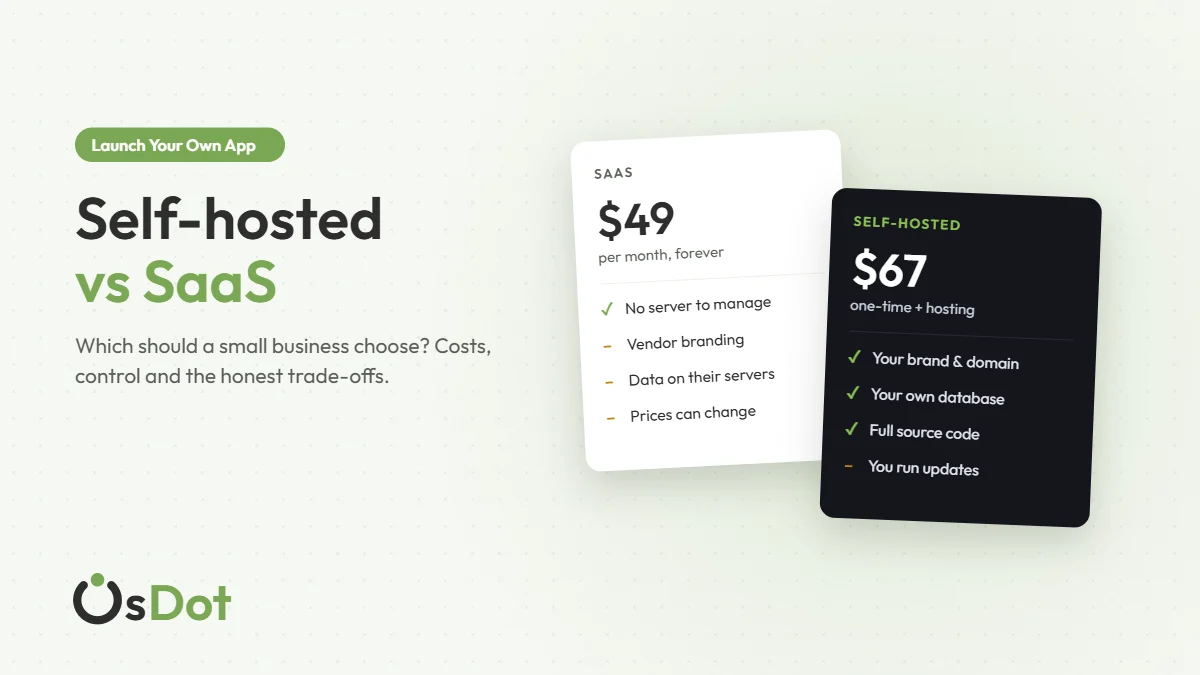
Sooner or later every small business that runs on software hits the same question. Do you keep paying a monthly subscription for someone else’s platform, or do you run your own copy on your own hosting? The first is SaaS (software as a service). The second is self-hosted software.
Neither is always right. We sell self-hosted software, so we have an obvious bias, and we’ll still tell you when SaaS is the better choice. This guide compares the two on the things that actually matter to a coaching institute, a salon, an agency or a small online business: cost over time, control, branding, effort and risk.
Key takeaways
- SaaS is the easiest start: no hosting, no updates to run. You pay every month, and the platform, data rules and branding stay in someone else’s hands.
- Self-hosted costs less over a few years and gives you full control and your own brand, but you (or someone you hire) look after hosting, backups and updates.
- The deciding questions: how long will you use it, how much do you need your own brand and data, and who will look after the server?
In this guide
What’s the actual difference?
SaaS is software you rent. The vendor runs it on their servers, you log in through a browser or app, and you pay a monthly or yearly fee for as long as you use it. Stop paying and you lose access. Think of most online booking tools, course platforms and CRMs.
Self-hosted software runs on hosting that you control: a shared hosting account, a VPS or a cloud server. You usually buy a licence once, install it on your own domain, and the data sits in your own database. Some self-hosted products, including ours, also come with the full source code, so a developer can change anything.
A useful way to picture it: SaaS is renting a furnished office in someone else’s building. Self-hosted is owning your shop. Renting is quicker to start and someone else fixes the plumbing. Owning costs less over time and you can repaint the walls, but the keys and the repairs are yours.
Self-hosted vs SaaS, side by side
| SaaS | Self-hosted | |
|---|---|---|
| How you pay | Monthly or yearly subscription, forever | Usually a one-time licence, plus hosting |
| Getting started | Sign up and go, often in minutes | Install on hosting; an installer or setup service helps |
| Your brand | Often the vendor’s subdomain, logo or app; white-label costs extra if offered | Your domain, your logo, your app name |
| Your data | Stored by the vendor, under their terms; exports vary | In your own database; you decide backups and access |
| Customization | Settings the vendor allows | Anything, if you have the source code |
| Price changes | The vendor can raise prices or change plans | Your licence price is paid; hosting is your choice |
| Updates and security | Handled by the vendor | You apply updates and keep the server secure |
| If the company disappears | The service can stop | Your copy keeps running |
What it really costs over three years
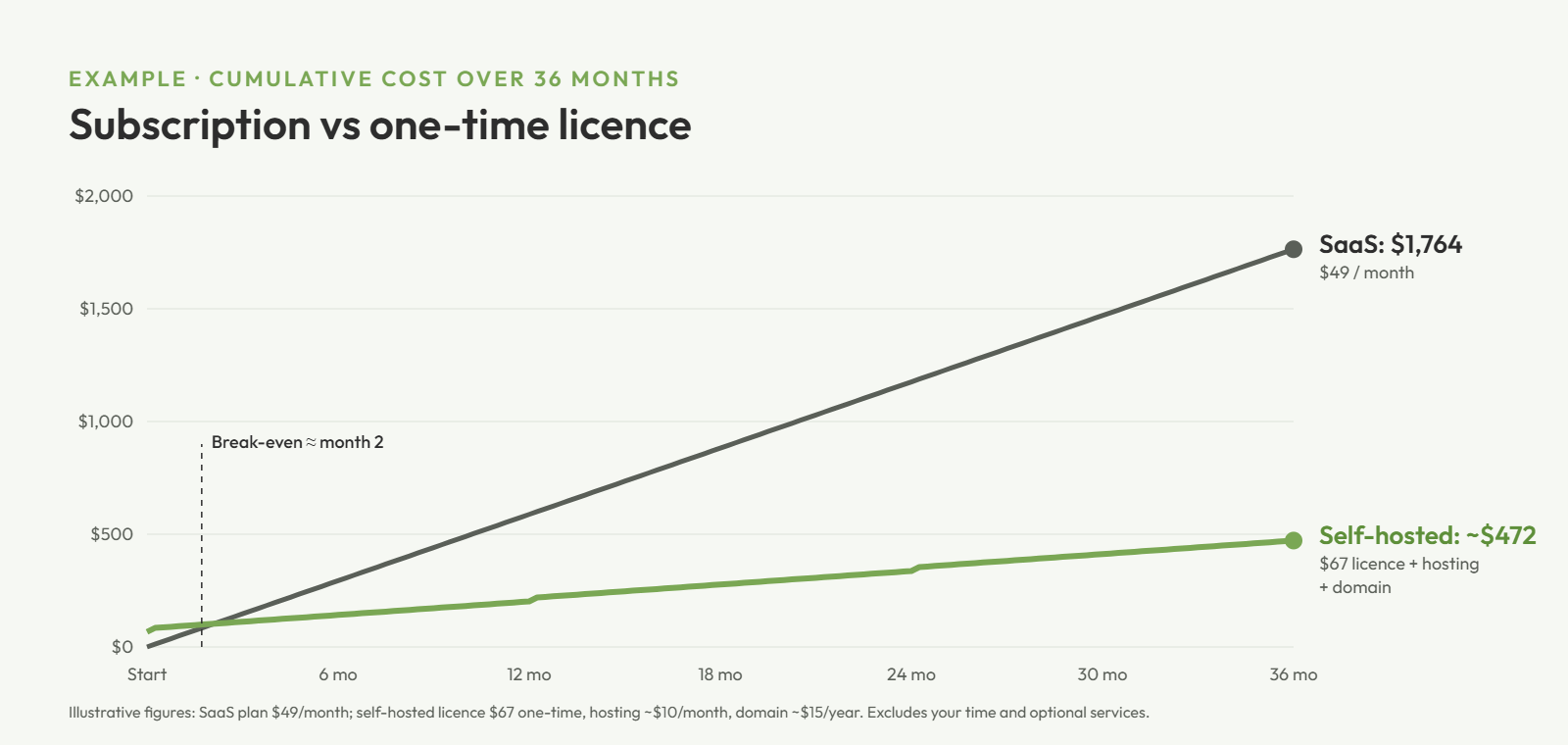
Monthly fees look small, which is the whole point of them. Add them up over the time you’ll actually use the software and the picture changes. Here’s an example with round numbers. Swap in the real prices you’re comparing.
| Example over 36 months | SaaS | Self-hosted |
|---|---|---|
| Software | $49/month × 36 = $1,764 | $67 one-time licence |
| Hosting | Included | About $10/month × 36 = $360 |
| Domain | Often extra for a custom domain | About $15/year × 3 = $45 |
| Total | $1,764 | about $472 |
That gap is real, but be honest with the self-hosted column. Add a value for your own time, or the cost of someone who installs and maintains it for you, and optional extras such as a paid support plan. Also count things both options can share: payment gateway fees, SMS costs, and app store fees if you publish a mobile app (Google Play charges a one-time $25 developer registration; Apple’s developer program is $99 a year).
Tip: Calculate the break-even month. Divide the extra up-front cost of self-hosting by the monthly saving. If you’ll use the software longer than that, self-hosting usually wins on price. For many small businesses it’s well under a year.
When SaaS is the better choice
- You’re testing an idea. If you might stop in three months, a monthly plan you can cancel is cheaper than any setup.
- Nobody can look after a server. If there’s no one in your team (or no budget for a freelancer) to handle hosting, updates and backups, SaaS removes that job entirely.
- You need it running today. Sign-up is faster than any installation.
- Your use is tiny. A free or very cheap plan that covers everything you need is hard to beat.
When self-hosted is the better choice
- You’ll use it for years. The longer you run it, the more the subscription total grows and the more a one-time licence pays off.
- Your brand matters. Students, clients or customers see your name, your domain and your app, not another company’s.
- You want to own your data. Your customer and student records live in your database, and you choose where it’s hosted and who can access it.
- You need changes. With the source code, a developer can add a feature, change a workflow or connect another system without asking a vendor.
- You want to resell. Agencies and entrepreneurs can launch the same platform for several clients under their own brand with a reseller or white-label licence, something most SaaS plans don’t allow.
The work self-hosting involves (and how to make it easy)
Self-hosting isn’t hard, but it isn’t zero work either. Here’s what you’re signing up for, and how to keep it light:
- Hosting. Pick hosting that meets the software’s requirements (for PHP apps: the right PHP version, a MySQL or MariaDB database, HTTPS and a cron job). Managed shared hosting covers most small businesses.
- Installation. A good product has an installer wizard that checks your server and sets up the database. If you’d rather not, pay for an installation service once.
- Backups. Turn on your host’s automatic backups and keep an occasional copy somewhere else. This is the one job you shouldn’t skip.
- Updates. Apply updates when the vendor releases them. Read the changelog, take a backup, then update.
- Security basics. HTTPS, strong admin passwords, up-to-date PHP, and only the people who need access having it.
Put together, that’s a few hours to set up and an hour or two a month afterwards, often less. Weigh that against the subscription you’d otherwise pay.
Security, compliance and uptime
Security. A reputable SaaS vendor has people whose whole job is security, which is a genuine advantage. With self-hosting, security comes down to your hosting provider and your own habits: updates applied, strong passwords, HTTPS, limited admin accounts. Neither is automatically safer. The difference is who’s responsible.
Data protection and compliance. With SaaS, your customer data sits with the vendor and often with their third-party sub-processors, so you rely on their data protection terms and the regions they store data in. Self-hosted software lets you choose the hosting location and decide exactly who has access, which can make data protection rules such as GDPR easier to reason about. You’re still responsible for following them either way, so check the rules that apply to your business.
Uptime. SaaS platforms usually publish an uptime target and handle outages for you. A self-hosted platform is as reliable as your host. Choose a reputable provider, and add a free uptime monitor so you hear about problems before your customers do.
What happens as you grow
SaaS pricing models usually scale with you: more users, students, bookings or features means a higher plan and a bigger subscription fee. That’s convenient early on and expensive later. Moving away also gets harder over time, because your data, workflows and customer habits are tied to one vendor.
With self-hosted software, growth mostly means upgrading your hosting, for example from shared hosting to a VPS or cloud hosting plan. Costs rise in small steps rather than per user, and you can scale the server on your own schedule. If you outgrow the features, you have the code to extend them.
The middle path: ready-made software you own
Building your own platform from scratch is the most expensive way to self-host. The practical option for most small businesses is buying ready-made, self-hosted software and putting your name on it. That’s what we make at OsDot: industry-specific platforms, each with a web app, an admin panel and a Flutter mobile app, sold once with the full source code.
Our first product, Academy & Exam OS, is a mock test and online exam platform for coaching institutes. It installs with a setup wizard on standard PHP hosting, keeps your students’ data in your own database, and runs under your brand on your domain and in your app. Normal software updates are included with every licence. If you don’t want to do the setup yourself, you can add our installation service, and a Priority Support plan is available if you want a direct line to us.
OsDot™ · Own the OS. Run Your Business.
Self-hosted software you buy once
- Web platform, admin panel and Flutter mobile app
- Full, unencrypted source code and an installer wizard
- Your brand, your domain, your data
- Single Site $67, Multi Site $127, Reseller / White-Label $499, all one-time
FAQ
Is self-hosted software more secure than SaaS?
It depends on who looks after it. A good SaaS vendor has a security team; self-hosted software is as secure as your hosting, updates and passwords. What self-hosting gives you is control: you decide where the data lives and who can access it.
Can I move from SaaS to self-hosted later?
Usually, if the SaaS tool lets you export your data, for example as CSV files. Check the export options before you commit to any platform, because that’s what makes switching possible.
Do I need a developer to self-host software?
Not for a standard installation. Products with an installer wizard can be set up on ordinary shared hosting by following the guide, or you can pay for an installation service. A developer is useful when you want to customize the code.
What hosting do I need for self-hosted PHP software?
Whatever the product’s requirements list: typically a supported PHP version, a MySQL or MariaDB database, HTTPS and the ability to run a cron job. Managed shared hosting is enough for most small businesses; larger ones may prefer a VPS.
Is a one-time licence really one-time?
For the software licence, yes. With OsDot products you pay once and normal updates are included. Your ongoing costs are hosting, your domain and any optional extras such as a yearly Priority Support plan.
How to decide in five minutes
Write down three numbers: how many months you expect to use the software, the monthly SaaS price, and the one-time cost of the self-hosted option plus hosting. Then answer one question honestly: who will look after the server? If you’ll use it for more than a year and you have an answer to that question, self-hosting is usually the better deal. If not, start with SaaS and revisit the decision when your business is steadier.
Want more practical guides like this one? Join the OsDot newsletter.

